{{ 'fb_in_app_browser_popup.desc' | translate }} {{ 'fb_in_app_browser_popup.copy_link' | translate }}
{{ 'in_app_browser_popup.desc' | translate }}
{{word('consent_desc')}} {{word('read_more')}}
{{setting.description}}
價格均含稅,下單享優惠!歡迎大量採購,由專人提供專案報價。
目前僅提供網路賣場服務,無實體店面,無自取服務。
價格均含稅,下單享優惠!歡迎大量採購,由專人提供專案報價。
目前僅提供網路賣場服務,無實體店面,無自取服務。
價格均含稅,下單享優惠!歡迎大量採購,由專人提供專案報價。
{{ childProduct.title_translations | translateModel }}
{{ getChildVariationShorthand(childProduct.child_variation) }}
{{ getSelectedItemDetail(selectedChildProduct, item).childProductName }} x {{ selectedChildProduct.quantity || 1 }}
{{ getSelectedItemDetail(selectedChildProduct, item).childVariationName }}
產品貨號:368030101098
區號:Qe13-07
品牌:
原廠貨號:
滿千免運優惠(限郵寄和超商純取貨) on order
本賣場無實體店面,無提供自取服務,敬請見諒。 on order
Not enough stock.
Your item was not added to your cart.
Not enough stock.
Please adjust your quantity.
{{'products.quick_cart.out_of_number_hint'| translate}}
{{'product.preorder_limit.hint'| translate}}
Limit {{ product.max_order_quantity }} per order.
Only {{ quantityOfStock }} item(s) left.
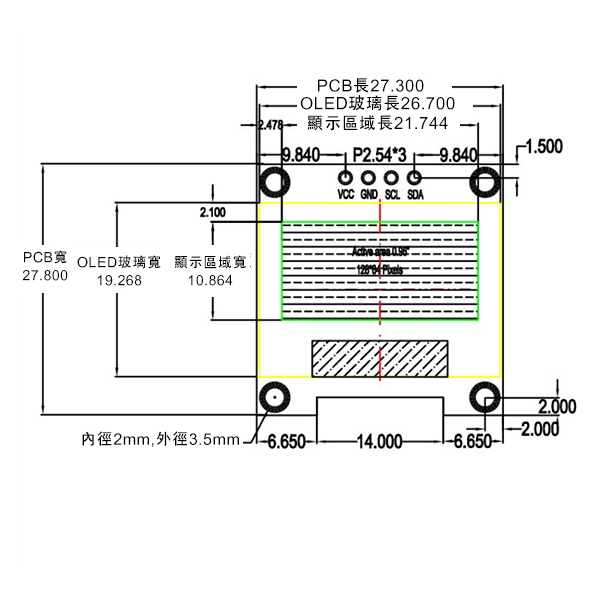
關於 OLED IIC 介面的順序,本商品有兩種排列順序,其區別僅僅在於 VCC 和 GND 順序不同,商品照為示意圖,實際介面順序以出貨商品為主。
| 接口類型 | IIC接口 |
| 管腳定義 | |
| VCC | 供應電源 3.3~5V |
| GND | 電源接地 |
| SCL | IIC 時鐘線 |
| SDA | IIC 數據線 |


操作流程
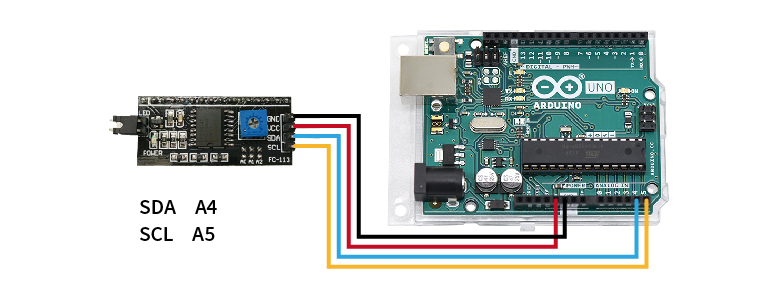
STEP 1. 將欲查詢的模組連接至Arduino UNO(附圖為腳位參考,實際請比對商品標示接線)

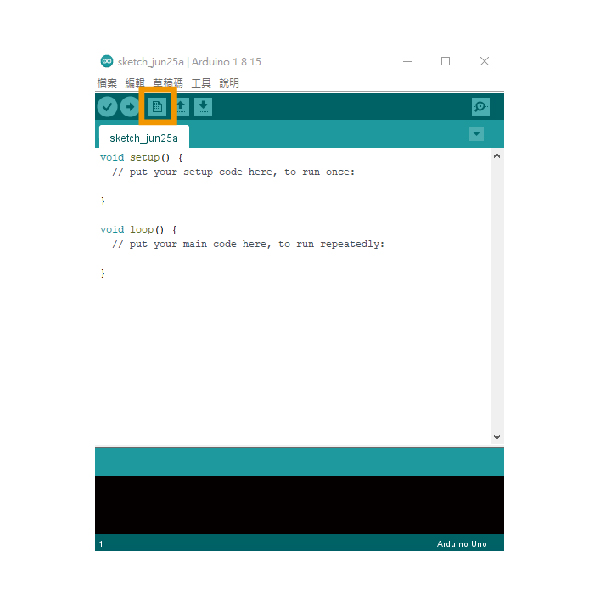
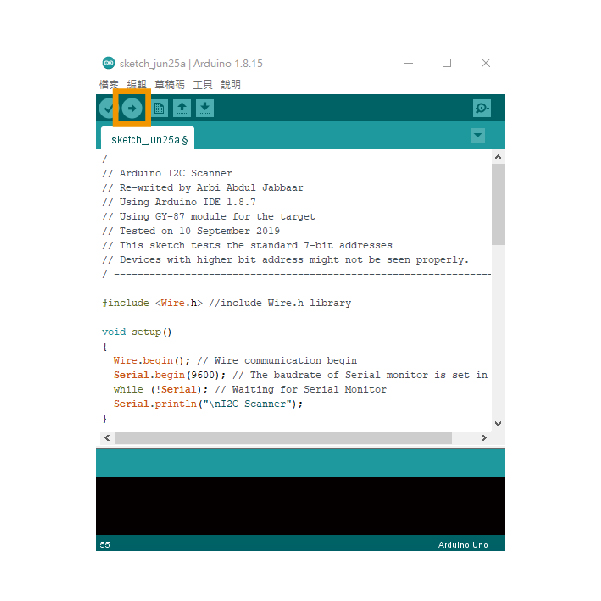
STEP 2. 開啟Arduino IDE並新增檔案

STEP 3. 貼入教學下方的範例文件,並上傳到Arduino UNO,即會開始掃描I2C位址

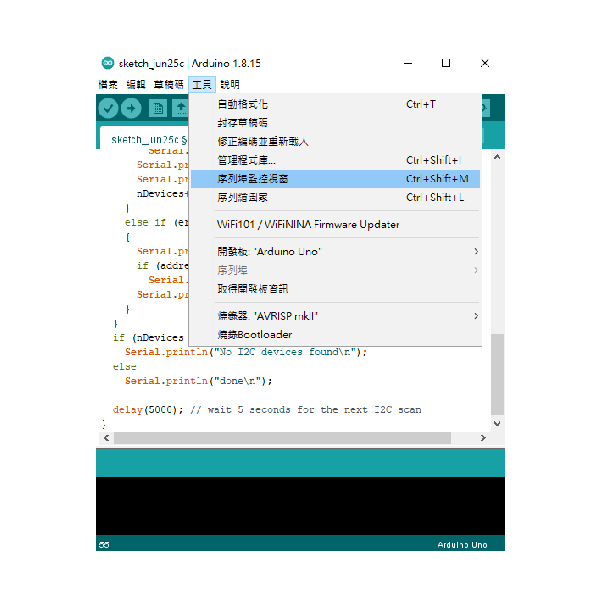
STEP 4. 開啟序列埠監控視窗,即可取得I2C位址

I2C掃描範例程式
| / ---------------------------------------------------------------- / |
| // Arduino I2C Scanner |
| // Re-writed by Arbi Abdul Jabbaar |
| // Using Arduino IDE 1.8.7 |
| // Using GY-87 module for the target |
| // Tested on 10 September 2019 |
| // This sketch tests the standard 7-bit addresses |
| // Devices with higher bit address might not be seen properly. |
| / ---------------------------------------------------------------- / |
| #include //include Wire.h library |
| void setup() |
| { |
| Wire.begin(); // Wire communication begin |
| Serial.begin(9600); // The baudrate of Serial monitor is set in 9600 |
| while (!Serial); // Waiting for Serial Monitor |
| Serial.println("\nI2C Scanner"); |
| } |
| void loop() |
| { |
| byte error, address; //variable for error and I2C address |
| int nDevices; |
| Serial.println("Scanning..."); |
| nDevices = 0; |
| for (address = 1; address < 127; address++ ) |
| { |
| // The i2c_scanner uses the return value of |
| // the Write.endTransmisstion to see if |
| // a device did acknowledge to the address. |
| Wire.beginTransmission(address); |
| error = Wire.endTransmission(); |
| if (error == 0) |
| { |
| Serial.print("I2C device found at address 0x"); |
| if (address < 16) |
| Serial.print("0"); |
| Serial.print(address, HEX); |
| Serial.println(" !"); |
| nDevices++; |
| } |
| else if (error == 4) |
| { |
| Serial.print("Unknown error at address 0x"); |
| if (address < 16) |
| Serial.print("0"); |
| Serial.println(address, HEX); |
| } |
| } |
| if (nDevices == 0) |
| Serial.println("No I2C devices found\n"); |
| else |
| Serial.println("done\n"); |
| delay(5000); // wait 5 seconds for the next I2C scan |
| } |