{{ 'fb_in_app_browser_popup.desc' | translate }} {{ 'fb_in_app_browser_popup.copy_link' | translate }}
{{ 'in_app_browser_popup.desc' | translate }}
{{word('consent_desc')}} {{word('read_more')}}
{{setting.description}}
{{ childProduct.title_translations | translateModel }}
{{ getChildVariationShorthand(childProduct.child_variation) }}
{{ getSelectedItemDetail(selectedChildProduct, item).childProductName }} x {{ selectedChildProduct.quantity || 1 }}
{{ getSelectedItemDetail(selectedChildProduct, item).childVariationName }}
Octopus brick passive buzzer module whose volume can be controlled with PWM
5V supply | Analog interface | S / V / G pins | Size 19 x 27mm
A sticker distinguishes it from the active buzzer version
滿千免運優惠(限郵寄和超商純取貨) on order
本賣場無實體店面,無提供自取服務,敬請見諒。 on order
Not enough stock.
Your item was not added to your cart.
Not enough stock.
Please adjust your quantity.
{{'products.quick_cart.out_of_number_hint'| translate}}
{{'product.preorder_limit.hint'| translate}}
Limit {{ product.max_order_quantity }} per order.
Only {{ quantityOfStock }} item(s) left.
八達通電子積木,您可以使用它們來構建電子項目,就像堆磚一樣簡單。 通過使用八達通電子積木,您可以輕鬆連接Arduino/Freaduino兼容板與各種數字、模擬和I2C/Uart接口。 這些無麵包板的牢固連接可用於廣泛的模組,如電位計、感測器、繼電器、伺服系統甚至按鈕,只需即插即用。 Octopus 無源蜂鳴器 Brick 是基於無源蜂鳴器,它可以通過 PWM 控制音量。 區別在於有源蜂鳴器貼紙。
操作流程
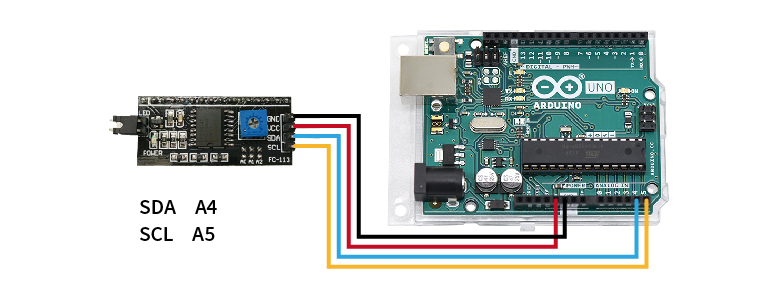
STEP 1. 將欲查詢的模組連接至Arduino UNO(附圖為腳位參考,實際請比對商品標示接線)

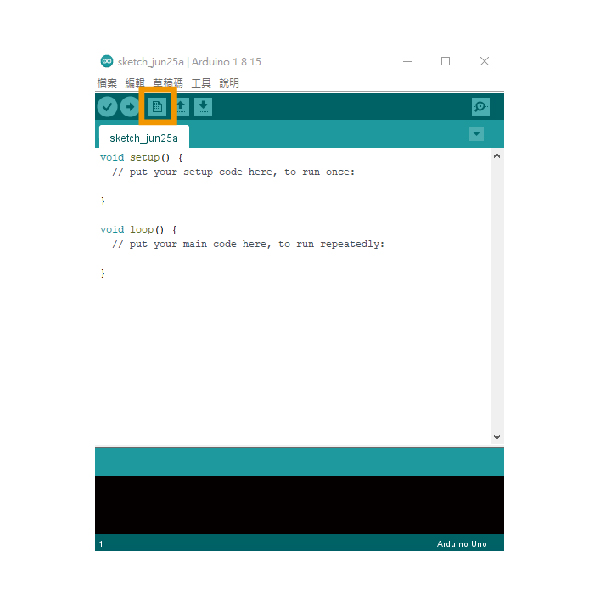
STEP 2. 開啟Arduino IDE並新增檔案

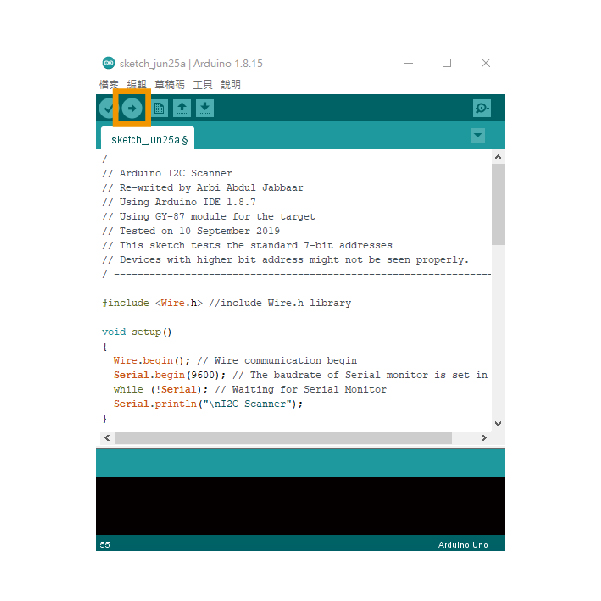
STEP 3. 貼入教學下方的範例文件,並上傳到Arduino UNO,即會開始掃描I2C位址

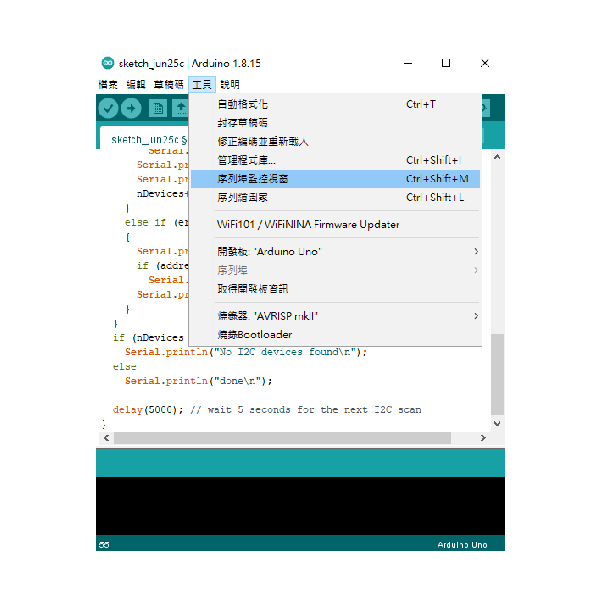
STEP 4. 開啟序列埠監控視窗,即可取得I2C位址

| / ---------------------------------------------------------------- / | |
| // Arduino I2C Scanner | |
| // Re-writed by Arbi Abdul Jabbaar | |
| // Using Arduino IDE 1.8.7 | |
| // Using GY-87 module for the target | |
| // Tested on 10 September 2019 | |
| // This sketch tests the standard 7-bit addresses | |
| // Devices with higher bit address might not be seen properly. | |
| / ---------------------------------------------------------------- / | |
| #include //include Wire.h library | |
| void setup() | |
| { | |
| Wire.begin(); // Wire communication begin | |
| Serial.begin(9600); // The baudrate of Serial monitor is set in 9600 | |
| while (!Serial); // Waiting for Serial Monitor | |
| Serial.println("\nI2C Scanner"); | |
| } | |
| void loop() | |
| { | |
| byte error, address; //variable for error and I2C address | |
| int nDevices; | |
| Serial.println("Scanning..."); | |
| nDevices = 0; | |
| for (address = 1; address < 127; address++ ) | |
| { | |
| // The i2c_scanner uses the return value of | |
| // the Write.endTransmisstion to see if | |
| // a device did acknowledge to the address. | |
| Wire.beginTransmission(address); | |
| error = Wire.endTransmission(); | |
| if (error == 0) | |
| { | |
| Serial.print("I2C device found at address 0x"); | |
| if (address < 16) | |
| Serial.print("0"); | |
| Serial.print(address, HEX); | |
| Serial.println(" !"); | |
| nDevices++; | |
| } | |
| else if (error == 4) | |
| { | |
| Serial.print("Unknown error at address 0x"); | |
| if (address < 16) | |
| Serial.print("0"); | |
| Serial.println(address, HEX); | |
| } | |
| } | |
| if (nDevices == 0) | |
| Serial.println("No I2C devices found\n"); | |
| else | |
| Serial.println("done\n"); | |
| delay(5000); // wait 5 seconds for the next I2C scan | |
| } |