{{ 'fb_in_app_browser_popup.desc' | translate }} {{ 'fb_in_app_browser_popup.copy_link' | translate }}
{{ 'in_app_browser_popup.desc' | translate }}
{{word('consent_desc')}} {{word('read_more')}}
{{setting.description}}
{{ childProduct.title_translations | translateModel }}
{{ getChildVariationShorthand(childProduct.child_variation) }}
{{ getSelectedItemDetail(selectedChildProduct, item).childProductName }} x {{ selectedChildProduct.quantity || 1 }}
{{ getSelectedItemDetail(selectedChildProduct, item).childVariationName }}
LCD 1602 yellow-green character display module with an I2C interface that uses only two I/O pins.
5V | I2C (IIC) | adjustable contrast | controllable backlight
Check the I2C chip on the back: PCF8574 uses address 0x27, PCF8574A uses 0x3F
滿千免運優惠(限郵寄和超商純取貨) on order
本賣場無實體店面,無提供自取服務,敬請見諒。 on order
Not enough stock.
Your item was not added to your cart.
Not enough stock.
Please adjust your quantity.
{{'products.quick_cart.out_of_number_hint'| translate}}
{{'product.preorder_limit.hint'| translate}}
Limit {{ product.max_order_quantity }} per order.
Only {{ quantityOfStock }} item(s) left.
| 商品簡介 |
使用前請確認LCD模組後方的I2C模組之IC型號,依據型號來調整程式碼中LCD的I2C位址。
如是PCF8574A就修改成0x3F
如是PCF8574就修改成0x27
| 如何查詢I2C位址 |
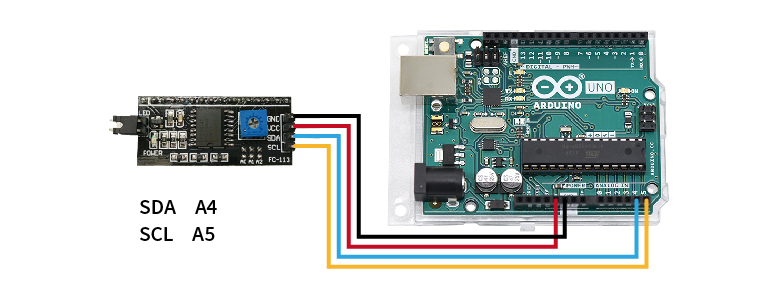
STEP 1. 將欲查詢的模組連接至Arduino UNO(附圖為腳位參考,實際請比對商品標示接線)

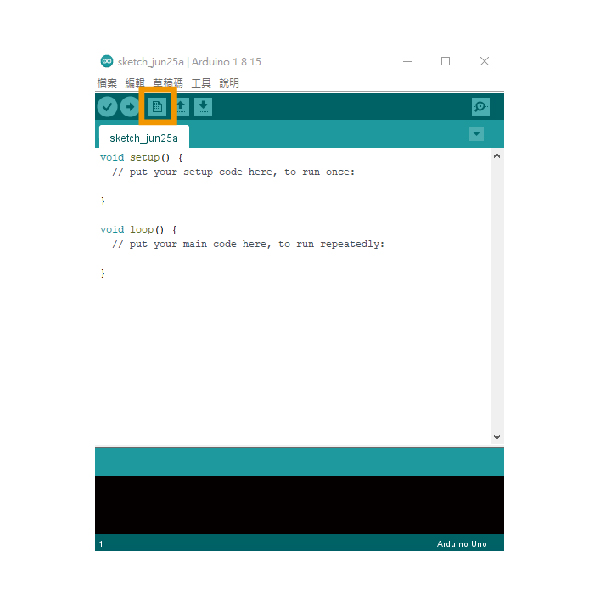
STEP 2. 開啟Arduino IDE並新增檔案

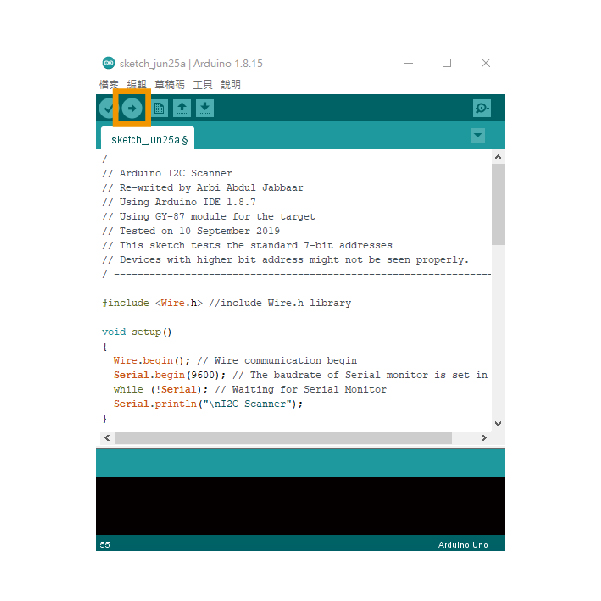
STEP 3. 貼入教學下方的範例文件,並上傳到Arduino UNO,即會開始掃描I2C位址

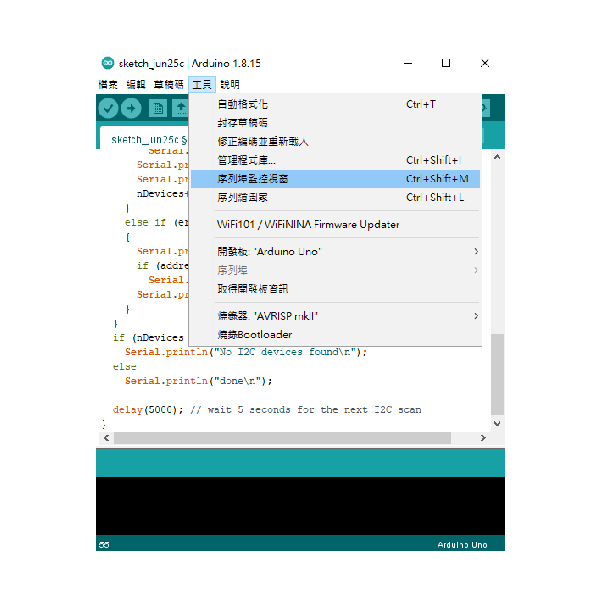
STEP 4. 開啟序列埠監控視窗,即可取得I2C位址

| / ---------------------------------------------------------------- / | |
| // Arduino I2C Scanner | |
| // Re-writed by Arbi Abdul Jabbaar | |
| // Using Arduino IDE 1.8.7 | |
| // Using GY-87 module for the target | |
| // Tested on 10 September 2019 | |
| // This sketch tests the standard 7-bit addresses | |
| // Devices with higher bit address might not be seen properly. | |
| / ---------------------------------------------------------------- / | |
| #include //include Wire.h library | |
| void setup() | |
| { | |
| Wire.begin(); // Wire communication begin | |
| Serial.begin(9600); // The baudrate of Serial monitor is set in 9600 | |
| while (!Serial); // Waiting for Serial Monitor | |
| Serial.println("\nI2C Scanner"); | |
| } | |
| void loop() | |
| { | |
| byte error, address; //variable for error and I2C address | |
| int nDevices; | |
| Serial.println("Scanning..."); | |
| nDevices = 0; | |
| for (address = 1; address < 127; address++ ) | |
| { | |
| // The i2c_scanner uses the return value of | |
| // the Write.endTransmisstion to see if | |
| // a device did acknowledge to the address. | |
| Wire.beginTransmission(address); | |
| error = Wire.endTransmission(); | |
| if (error == 0) | |
| { | |
| Serial.print("I2C device found at address 0x"); | |
| if (address < 16) | |
| Serial.print("0"); | |
| Serial.print(address, HEX); | |
| Serial.println(" !"); | |
| nDevices++; | |
| } | |
| else if (error == 4) | |
| { | |
| Serial.print("Unknown error at address 0x"); | |
| if (address < 16) | |
| Serial.print("0"); | |
| Serial.println(address, HEX); | |
| } | |
| } | |
| if (nDevices == 0) | |
| Serial.println("No I2C devices found\n"); | |
| else | |
| Serial.println("done\n"); | |
| delay(5000); // wait 5 seconds for the next I2C scan | |
| } |
| 出貨清單 |