{{ 'fb_in_app_browser_popup.desc' | translate }} {{ 'fb_in_app_browser_popup.copy_link' | translate }}
{{ 'in_app_browser_popup.desc' | translate }}
{{word('consent_desc')}} {{word('read_more')}}
{{setting.description}}
{{ childProduct.title_translations | translateModel }}
{{ getChildVariationShorthand(childProduct.child_variation) }}
{{ getSelectedItemDetail(selectedChildProduct, item).childProductName }} x {{ selectedChildProduct.quantity || 1 }}
{{ getSelectedItemDetail(selectedChildProduct, item).childVariationName }}
SGP30 multi-pixel MOX gas sensor reporting TVOC and eCO2 (calculated from H2 concentration)
I2C | eCO2 400-60000ppm | TVOC 0-60000ppb | STEMMA QT / Qwiic compatible | 25.5 x 17.7 x 4.6mm
Works with 3.3V and 5V systems such as Raspberry Pi and Arduino Uno
滿千免運優惠(限郵寄和超商純取貨) on order
本賣場無實體店面,無提供自取服務,敬請見諒。 on order
Not enough stock.
Your item was not added to your cart.
Not enough stock.
Please adjust your quantity.
{{'products.quick_cart.out_of_number_hint'| translate}}
{{'product.preorder_limit.hint'| translate}}
Limit {{ product.max_order_quantity }} per order.
Only {{ quantityOfStock }} item(s) left.
SGP30 多像素氣體感測器是一款 MOX 氣體感測器,讓您輕鬆呼吸。 這是一款非常精細的空氣質量感測器,具有 I2C 接口和完全校準的輸出信號,測量值內的典型精度為 15%。 SGP 在一個晶片上結合了多個金屬氧化物感測元件,以提供更詳細的空氣質量信號。
這是一種氣體感測器,可以檢測各種揮發性有機化合物 (VOC) 和 H2,用於室內空氣質量監測。 當連接到您的微控制器(運行我們的庫代碼)時,它將通過 I2C 返回總揮發性有機化合物 (TVOC) 讀數和等效的二氧化碳讀數 (eCO2)。
SGP30 有一個“標準”熱板 MOX 感測器,以及一個控制板電源的小型微控制器,讀取模擬電壓,跟踪基線校準,計算 TVOC 和 eCO2 值,並提供一個 I2C 接口來讀取 . 與 CCS811 不同,該感測器不需要 I2C 時鐘延長。
這部分將測量百萬分之 400 至 60,000 (ppm) 範圍內的 eCO2(等效計算二氧化碳)濃度和十億分之 60,000 (ppb) 範圍內的 TVOC(總揮發性有機化合物)濃度。
請注意,該感測器與所有 VOC/氣體感測器一樣,具有可變性,為了獲得精確測量,您需要根據已知來源對其進行校準! 也就是說,對於一般環境感測器,它會讓您對趨勢比較有一個很好的理解。 SGP30 確實具有內置校準功能,請注意,eCO2 是根據 H2 濃度計算的,它不是供實驗室使用的“真正”CO2 感測器。
該感測器的另一個不錯的元素是能夠設置濕度補償以獲得更高的精度。 需要外部濕度感測器,然後通過 I2C 將 RH% 寫入感測器,以便更好地計算 TVOC/eCO2 值。
表面貼裝感測器焊接在 STEMMA QT 外形的定制 PCB 上,使其易於連接。 兩側的 STEMMA QT 連接器與 SparkFun Qwiic I2C 連接器兼容。 這允許您在開發板和 SGP30 之間進行無焊連接,或使用兼容電纜將其與各種其他感測器和附件鏈接。
此商品已經將所有引腳斷開到標準接頭並添加 1.8V 電壓調節器和電壓轉換,因此您可以將其用於 3.3V 或 5V 系統,例如 Raspberry Pi、Metro M4 或 Arduino Uno。
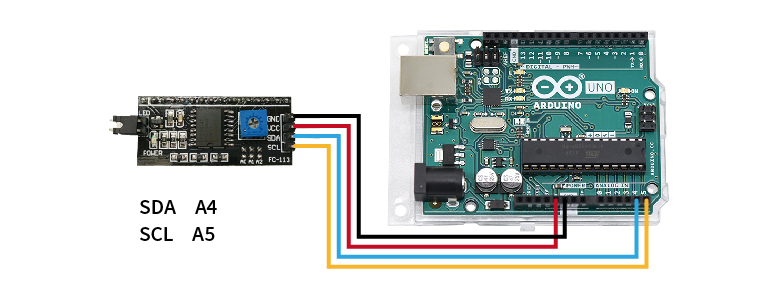
STEP 1. 將欲查詢的模組連接至Arduino UNO(附圖為腳位參考,實際請比對商品標示接線)

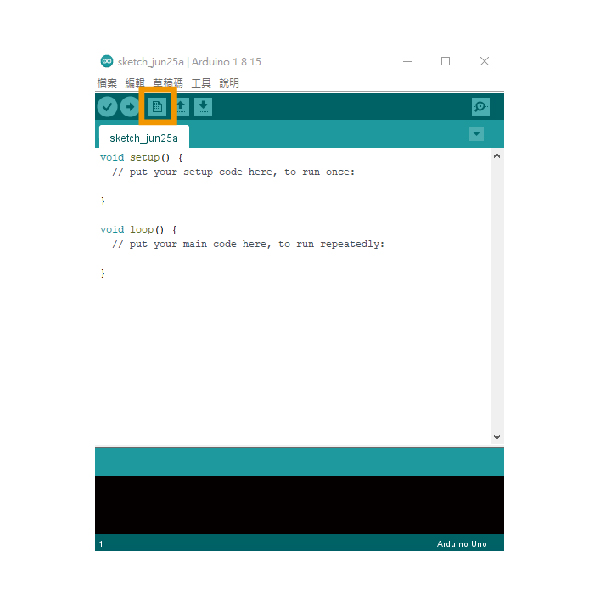
STEP 2. 開啟Arduino IDE並新增檔案

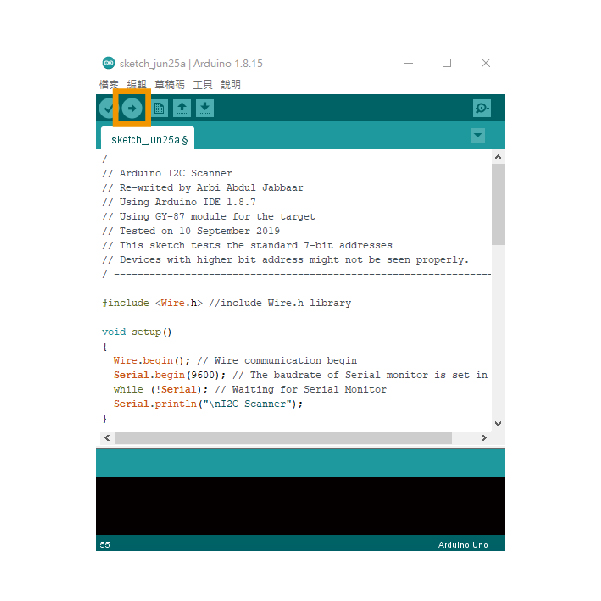
STEP 3. 貼入教學下方的範例文件,並上傳到Arduino UNO,即會開始掃描I2C位址

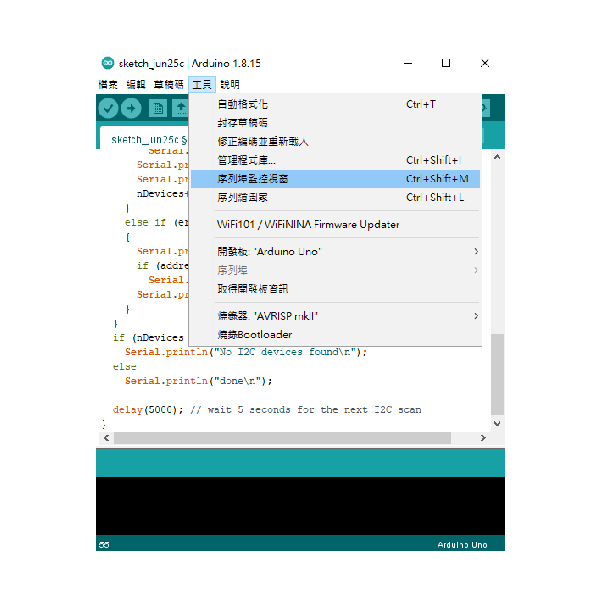
STEP 4. 開啟序列埠監控視窗,即可取得I2C位址

| / ---------------------------------------------------------------- / | |
| // Arduino I2C Scanner | |
| // Re-writed by Arbi Abdul Jabbaar | |
| // Using Arduino IDE 1.8.7 | |
| // Using GY-87 module for the target | |
| // Tested on 10 September 2019 | |
| // This sketch tests the standard 7-bit addresses | |
| // Devices with higher bit address might not be seen properly. | |
| / ---------------------------------------------------------------- / | |
| #include //include Wire.h library | |
| void setup() | |
| { | |
| Wire.begin(); // Wire communication begin | |
| Serial.begin(9600); // The baudrate of Serial monitor is set in 9600 | |
| while (!Serial); // Waiting for Serial Monitor | |
| Serial.println("\nI2C Scanner"); | |
| } | |
| void loop() | |
| { | |
| byte error, address; //variable for error and I2C address | |
| int nDevices; | |
| Serial.println("Scanning..."); | |
| nDevices = 0; | |
| for (address = 1; address < 127; address++ ) | |
| { | |
| // The i2c_scanner uses the return value of | |
| // the Write.endTransmisstion to see if | |
| // a device did acknowledge to the address. | |
| Wire.beginTransmission(address); | |
| error = Wire.endTransmission(); | |
| if (error == 0) | |
| { | |
| Serial.print("I2C device found at address 0x"); | |
| if (address < 16) | |
| Serial.print("0"); | |
| Serial.print(address, HEX); | |
| Serial.println(" !"); | |
| nDevices++; | |
| } | |
| else if (error == 4) | |
| { | |
| Serial.print("Unknown error at address 0x"); | |
| if (address < 16) | |
| Serial.print("0"); | |
| Serial.println(address, HEX); | |
| } | |
| } | |
| if (nDevices == 0) | |
| Serial.println("No I2C devices found\n"); | |
| else | |
| Serial.println("done\n"); | |
| delay(5000); // wait 5 seconds for the next I2C scan | |
| } |