{{ 'fb_in_app_browser_popup.desc' | translate }} {{ 'fb_in_app_browser_popup.copy_link' | translate }}

{{ 'in_app_browser_popup.desc' | translate }}

價格均含稅,下單享優惠!歡迎大量採購,由專人提供專案報價。

目前僅提供網路賣場服務,無實體店面,無自取服務。

價格均含稅,下單享優惠!歡迎大量採購,由專人提供專案報價。

目前僅提供網路賣場服務,無實體店面,無自取服務。

價格均含稅,下單享優惠!歡迎大量採購,由專人提供專案報價。

M5Stack 串列通訊擴展模組-M011

M5Stack 串列通訊擴展模組-M011

COMMU 是M5Stack堆疊模組系列中的一款,通訊轉換模組,其內部集成了2個I2C接口、1個TTL接口、1個CAN接口、1個RS485接口,能夠滿足開發時遇到的各種通訊轉換需求。

產品貨號:368031600032
區號:Qf19-09
品牌:M5Stack
原廠貨號:M011


滿千免運優惠(限郵寄和超商純取貨) on order

本賣場無實體店面,無提供自取服務,敬請見諒。 on order

NT$405
{{shoplineProductReview.avg_score}} {{'product.product_review.stars' | translate}} | {{shoplineProductReview.total}} {{'product.product_review.reviews' | translate}}
{{amazonProductReview.avg_rating}} {{'product.product_review.stars' | translate}} | {{amazonProductReview.total_comment_count}} {{'product.product_review.reviews' | translate}}
Quantity Product set quantity
The maximum quantity per submit is 99999
This quantity is invalid, please enter a valid quantity.
Sold Out

Not enough stock.
Your item was not added to your cart.

Not enough stock.
Please adjust your quantity.

{{'products.quick_cart.out_of_number_hint'| translate}}

{{'product.preorder_limit.hint'| translate}}

Limit {{ product.max_order_quantity }} per order.

Only {{ quantityOfStock }} item(s) left.

Please message the shop owner for order details.
Description
Shipping & Payment
Description

商品簡介

COMMU 是M5Stack堆疊模組系列中的一款,通訊轉換模組,其內部集成了2個I2C接口、1個TTL接口、1個CAN接口、1個RS485接口,能夠滿足開發時遇到的各種通訊轉換需求。

默認連接:TTL - UART0,RS485 - UART2.ESP32允許引腳映射重分配,所以你可以將TTL或是RS485接口重新定義到其他引腳


商品特色

●支援IIC,TTL,RS485,CAN等多種通訊協議


商品規格


規格 參數
接口 I2C x2, CAN x1, RS485 x1, TTL x1
CAN 控制器 MCP2515-1/SO
RS485收發器 SP3485EN-L/TR
淨重 13.5g
產品尺寸 54.2x54.2x13 mm


文件下載

資料手冊


範例程序

Arduino IDE

請點擊查看Arduino範例程序


如何查詢I2C位址


操作流程

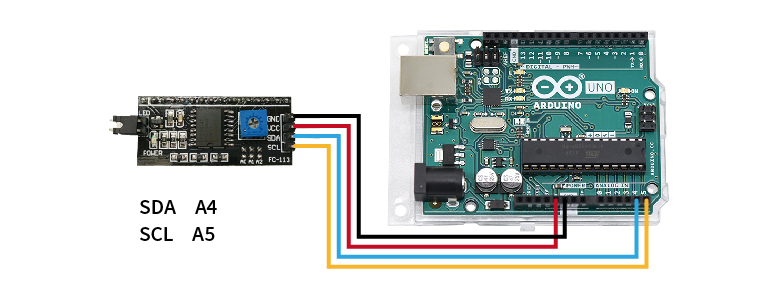
STEP 1. 將欲查詢的模組連接至Arduino UNO(附圖為腳位參考,實際請比對商品標示接線)

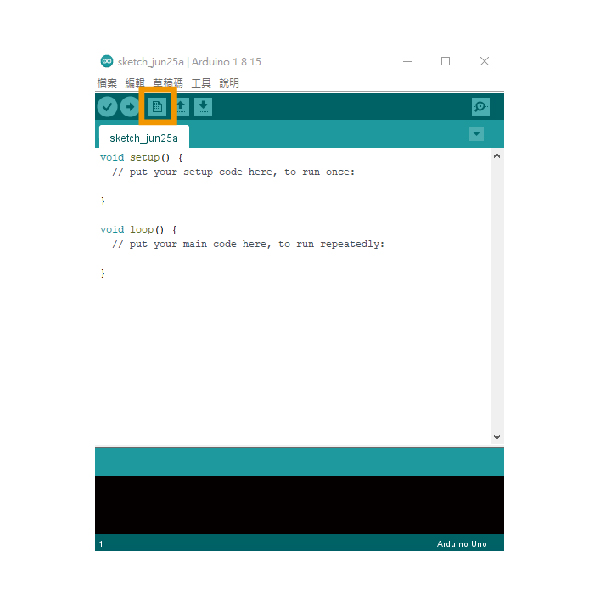
STEP 2. 開啟Arduino IDE並新增檔案

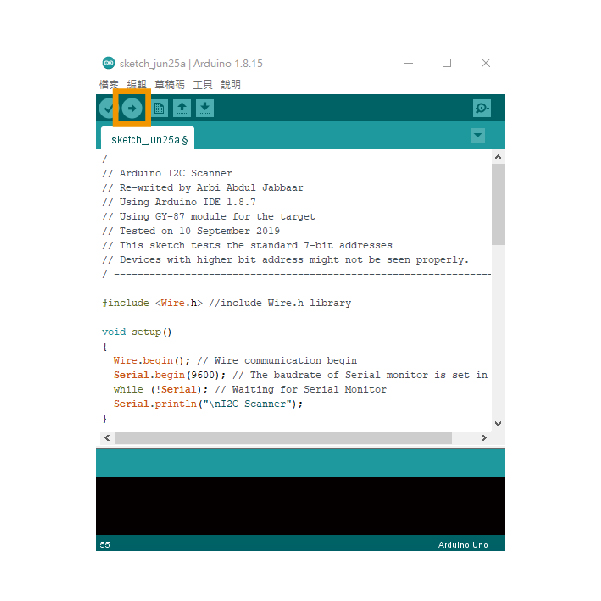
STEP 3. 貼入教學下方的範例文件,並上傳到Arduino UNO,即會開始掃描I2C位址

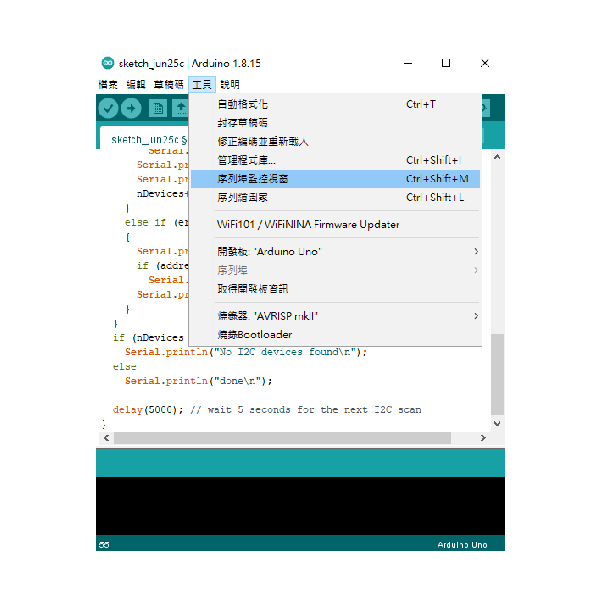
STEP 4. 開啟序列埠監控視窗,即可取得I2C位址

I2C掃描範例程式

/ ---------------------------------------------------------------- /
// Arduino I2C Scanner
// Re-writed by Arbi Abdul Jabbaar
// Using Arduino IDE 1.8.7
// Using GY-87 module for the target
// Tested on 10 September 2019
// This sketch tests the standard 7-bit addresses
// Devices with higher bit address might not be seen properly.
/ ---------------------------------------------------------------- /
#include //include Wire.h library
void setup()
{
Wire.begin(); // Wire communication begin
Serial.begin(9600); // The baudrate of Serial monitor is set in 9600
while (!Serial); // Waiting for Serial Monitor
Serial.println("\nI2C Scanner");
}
void loop()
{
byte error, address; //variable for error and I2C address
int nDevices;
Serial.println("Scanning...");
nDevices = 0;
for (address = 1; address < 127; address++ )
{
// The i2c_scanner uses the return value of
// the Write.endTransmisstion to see if
// a device did acknowledge to the address.
Wire.beginTransmission(address);
error = Wire.endTransmission();
if (error == 0)
{
Serial.print("I2C device found at address 0x");
if (address < 16)
Serial.print("0");
Serial.print(address, HEX);
Serial.println(" !");
nDevices++;
}
else if (error == 4)
{
Serial.print("Unknown error at address 0x");
if (address < 16)
Serial.print("0");
Serial.println(address, HEX);
}
}
if (nDevices == 0)
Serial.println("No I2C devices found\n");
else
Serial.println("done\n");
delay(5000); // wait 5 seconds for the next I2C scan
}


出貨清單

  • M5Stack 串列通訊擴展模組 x 1
Shipping & Payment

Delivery Options

  • Overseas (FedEx)
  • Overseas (Post)
  • Postal delivery
  • 7-11 Pickup and pay in store (C2C)
  • 7-11 Pickup only (C2C)
  • Tcat - Room Temp.
  • Tcat - Room Temp. (Collect on Delivery)
  • Draft quotation

Payment Options

  • Bank transfer
  • Sales Coordinator Contact
  • Credit Card
  • Tcat (Collect on Delivery)
  • Pay on 7-11 Store Pickup (C2C)

Related Products