{{ 'fb_in_app_browser_popup.desc' | translate }} {{ 'fb_in_app_browser_popup.copy_link' | translate }}
{{ 'in_app_browser_popup.desc' | translate }}
{{word('consent_desc')}} {{word('read_more')}}
{{setting.description}}
價格均含稅,下單享優惠!歡迎大量採購,由專人提供專案報價。
目前僅提供網路賣場服務,無實體店面,無自取服務。
價格均含稅,下單享優惠!歡迎大量採購,由專人提供專案報價。
目前僅提供網路賣場服務,無實體店面,無自取服務。
價格均含稅,下單享優惠!歡迎大量採購,由專人提供專案報價。
{{ childProduct.title_translations | translateModel }}
{{ getChildVariationShorthand(childProduct.child_variation) }}
{{ getSelectedItemDetail(selectedChildProduct, item).childProductName }} x {{ selectedChildProduct.quantity || 1 }}
{{ getSelectedItemDetail(selectedChildProduct, item).childVariationName }}
產品貨號:368031001119
區號:
品牌:Adafruit
原廠貨號:2717
滿千免運優惠(限郵寄和超商純取貨) on order
本賣場無實體店面,無提供自取服務,敬請見諒。 on order
Not enough stock.
Your item was not added to your cart.
Not enough stock.
Please adjust your quantity.
{{'products.quick_cart.out_of_number_hint'| translate}}
{{'product.preorder_limit.hint'| translate}}
Limit {{ product.max_order_quantity }} per order.
Only {{ quantityOfStock }} item(s) left.
| 商品簡介 |
你找到了完美的 I2C 感測器,這個晶片有一個固定的 I2C 地址,根據我對 I2C 的了解,你不可能有 兩個設備在相同的 SDA/SCL 引腳上具有相同的地址! 如果您沒有這款超酷的 TCA9548A 1 對 8 I2C 多路復用器,您會的!
最後,一種將多達 8 個相同地址的 I2C 設備連接到一個微控制器的方法 - 該多路復用器充當看門人,使用您的命令將命令傳送到選定的一組 I2C 引腳。
使用它相當簡單:多路復用器本身位於 I2C 地址 0x70(但可以從 0x70 調整到 0x77),您只需將具有所需多路復用輸出編號的單個字節寫入該端口,然後 bam - 任何未來的 I2C 數據包 將被發送到該端口。 理論上,您可以在 0x70-0x77 地址中的每一個上擁有 8 個這樣的多路復用器,以便控制相同 I2C 尋址部分的 64 個。
像所有 Adafruit 突破一樣,我們將這款出色的放在突破上,這樣您就可以在帶有電容器、上拉和下拉的麵包板上使用它,使用變得更簡單。 需要一些接頭,一旦焊接,您就可以將其插入無焊麵包板。 晶片本身符合 3V 和 5V 標準,因此您可以將其用於任何邏輯電平。
| 商品規格 |
| 如何查詢I2C位址 |
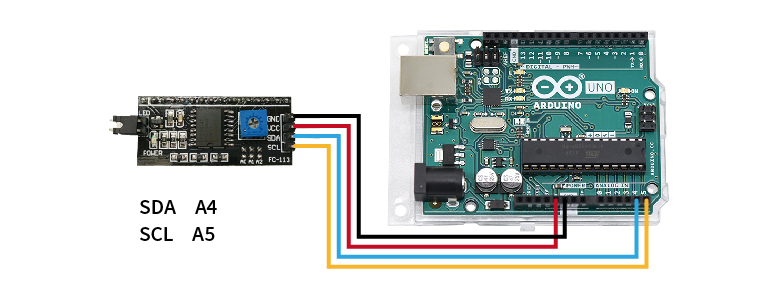
STEP 1. 將欲查詢的模組連接至Arduino UNO(附圖為腳位參考,實際請比對商品標示接線)

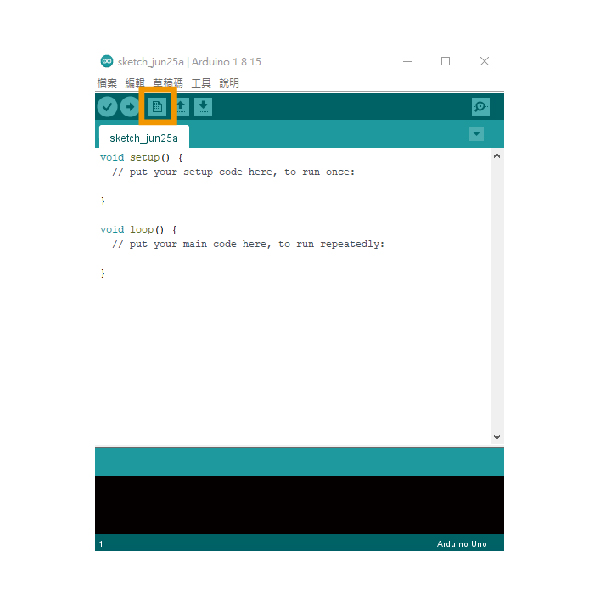
STEP 2. 開啟Arduino IDE並新增檔案

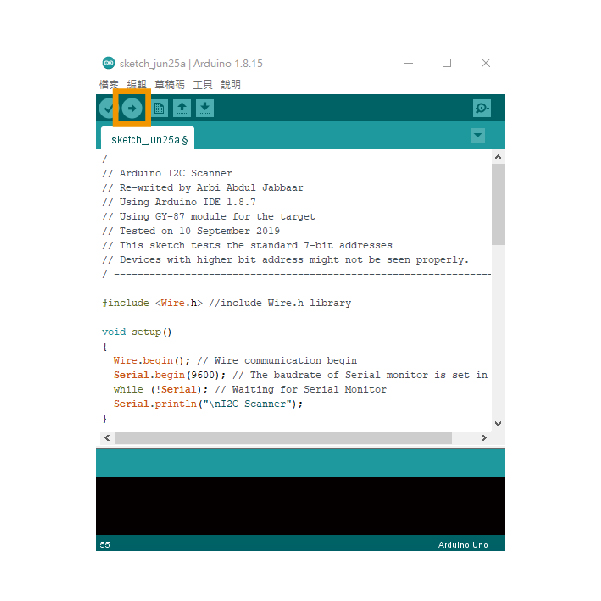
STEP 3. 貼入教學下方的範例文件,並上傳到Arduino UNO,即會開始掃描I2C位址

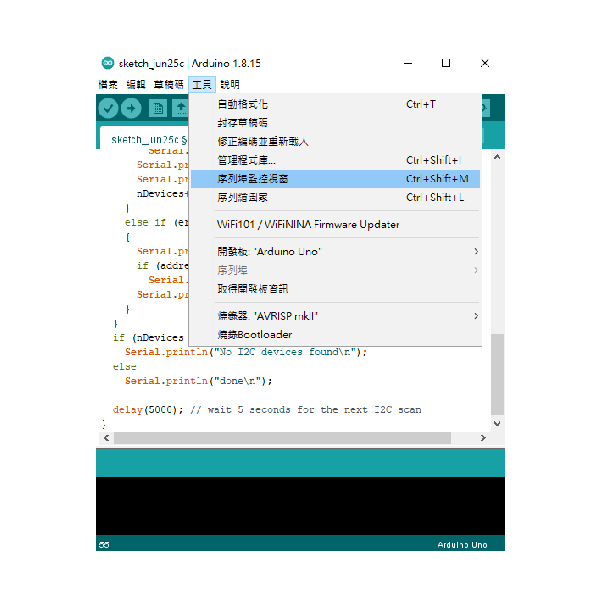
STEP 4. 開啟序列埠監控視窗,即可取得I2C位址

| / ---------------------------------------------------------------- / | |
| // Arduino I2C Scanner | |
| // Re-writed by Arbi Abdul Jabbaar | |
| // Using Arduino IDE 1.8.7 | |
| // Using GY-87 module for the target | |
| // Tested on 10 September 2019 | |
| // This sketch tests the standard 7-bit addresses | |
| // Devices with higher bit address might not be seen properly. | |
| / ---------------------------------------------------------------- / | |
| #include //include Wire.h library | |
| void setup() | |
| { | |
| Wire.begin(); // Wire communication begin | |
| Serial.begin(9600); // The baudrate of Serial monitor is set in 9600 | |
| while (!Serial); // Waiting for Serial Monitor | |
| Serial.println("\nI2C Scanner"); | |
| } | |
| void loop() | |
| { | |
| byte error, address; //variable for error and I2C address | |
| int nDevices; | |
| Serial.println("Scanning..."); | |
| nDevices = 0; | |
| for (address = 1; address < 127; address++ ) | |
| { | |
| // The i2c_scanner uses the return value of | |
| // the Write.endTransmisstion to see if | |
| // a device did acknowledge to the address. | |
| Wire.beginTransmission(address); | |
| error = Wire.endTransmission(); | |
| if (error == 0) | |
| { | |
| Serial.print("I2C device found at address 0x"); | |
| if (address < 16) | |
| Serial.print("0"); | |
| Serial.print(address, HEX); | |
| Serial.println(" !"); | |
| nDevices++; | |
| } | |
| else if (error == 4) | |
| { | |
| Serial.print("Unknown error at address 0x"); | |
| if (address < 16) | |
| Serial.print("0"); | |
| Serial.println(address, HEX); | |
| } | |
| } | |
| if (nDevices == 0) | |
| Serial.println("No I2C devices found\n"); | |
| else | |
| Serial.println("done\n"); | |
| delay(5000); // wait 5 seconds for the next I2C scan | |
| } |
| 出貨清單 |